
LIS 568 – PIXTON – Tool 3
Pixton: An app that makes visual storytelling accessible to all users, even those who have limited artistic talent!
In 2024, Pixton was named one of the ‘Best Digital Tools for Teaching & Learning’ by the AASL. Pixton is a comic-based storytelling app that enables teachers and students to create images easily. Pixton also complies with privacy laws, including COPPA, CSPC, and FERPA. It is also Ed Law 2-d compliant.
Pixton’s website lists several additional accolades, including a link to an ESSA evidence packet. The packet discusses the rationale behind adopting the technology, and I’d recommend anyone considering the app to read it. What grabbed my attention was the claim, “Pixton enables everyone, regardless of artistic ability, to tell their stories – no matter the purpose” (ESSA evidence, 3). THANK GOODNESS! This is fantastic news because I can’t even draw stick figures. I spent the first twenty years of my career as a social studies teacher and would ask students to create political cartoons and illustrated comics throughout the school year. Some of my students loved these types of assignments, while others detested them. Those who disliked these types of creative assignments often balked because they weren’t good artists. When I reflect upon my school career, I recognize that I have a lot in common with the haters. I could spend five hours painstakingly drawing something, only for the final result to look like someone took multiple crayons in their hand and scribbled on the paper. Pixton evens the playing field and allows students to express their ideas without the added challenge of illustrating them freehand. I can see students absolutely loving this app!
WHAT I LIKED…
- Countless backgrounds – thousands
- Customization of characters – skin color, hair color, hair style, and more
- Ability to add objects
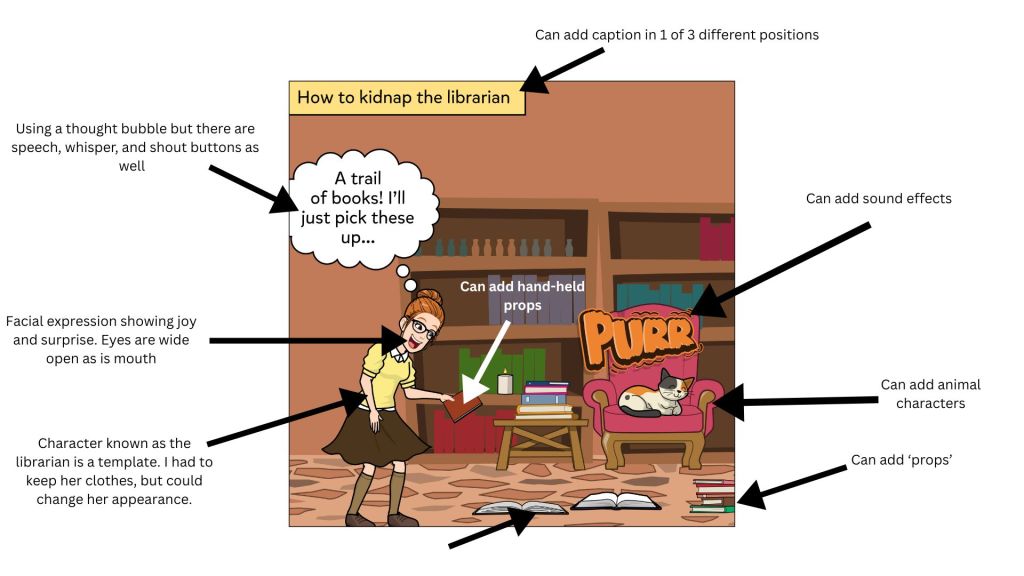
- Handheld props
- Other objects
- Includes speech, thought, shout, and whisper bubbles to more accurately portray tone
- Ability to customize the facial expressions of the characters in the comic
- 548 different facial expressions (yup, I counted)
- Can customize character actions
- Yawn, kneel, gasp, sobbing with hands over face, delivering Shakespearean monologues
- The creators consciously developed the app to support culturally responsive teaching practices. Students can design avatars that look like them and can be added to the comics/projects.
WHAT I DIDN’T LIKE…
- Some of the item/prop features are fixed in specific positions and don’t allow freedom of movement.
- Ex. I tried to put a fishing pole on the opposite side of my sample cartoon so I could attach a book to it. I wanted it to look as though someone was reeling the books and my avatar in. However, the fishing pole could only be placed in my character’s hand, which wasn’t what I was going for.
- Pricing tiers are unclear and inconsistent, depending on how one accesses the pricing information
- Need clearer instructions regarding educator accounts
- I spent an hour or so playing on the app and creating a comic under an educator account that I’d created using my personal email address. When I went to download my cartoon, it sent me to the pricing page. The information on the pricing page wasn’t aligning with the information that I’d read about the free educator account.
- The solution was to sign up with my school email, which allowed me to download my creation. Educators can create 20 cartoons total.
HOW WOULD I USE PIXTON?
- Create political cartoons
- Check for understanding
- Have students create an image to show they understand a topic
- Create an image to be used as a story starter for a writing assignment
- Create an image that portrays the ____ of a novel
- Setting
- Plot
- Resolution
- Main characters
- Main conflict
- Create an alternate ending to a story
- SEL learning
- Create an image and ask students to interpret body language and facial expressions.
- Recreate favorite book scenes
- Imagine and write a conversation between two historical figures
- Recreate a historical event
- Create a Pixton to highlight a key figure in a unit or to feature an individual during Women’s History Month, Black History Month, Native American History Month, and/or Pride Month.
- Create picture definitions of vocabulary terms
- Have World language students read a comic and translate it using the context clues in the image
Overall, I am impressed by the large image and template library; however, I can see students becoming overwhelmed and distracted by the plethora of choices. Even though students can search keywords for specific results, 548 facial expressions are a lot to sort through. I’d want to have the students spend some time getting to know Pixton before asking them to produce an image quickly for something like an exit ticket.
I was so excited to try out all the features, I immediately logged in, created a free account, and began experimenting. I’d just seen a BookTok short about the best way to kidnap a reader was to lay out a book trail trap, so I thought I’d recreate that scene for fun. You can see my quick cartoon below and some of the elements I included.
This is definitely an app I suggest you check out. If you do, I’d love to hear about your experience in the comments.
 unapologeticallyb00kish
Leave a comment