
Wordwall: A Tech Twist on a Vocabulary Favorite
Still using traditional wordwalls where you laminate key vocabulary and post it on the wall? I used to have a wordwall for each of my World history and US history units in an attempt to support literacy. At one point I upgraded my wordwall materials by adding an image to each term. It was time consuming to constantly update the wall and students paid little attention to it.
The first version of Wordwall was created in a secondary classroom in London and consisted of a typed list of words, a random picker function, and spinning noises to make it more exciting. The tool evolved, but it was still created for a niche group and required expensive hardware to use. Eventually, in 2016 the Wordwall.net website went live. This new website enables educators to create and share resources.
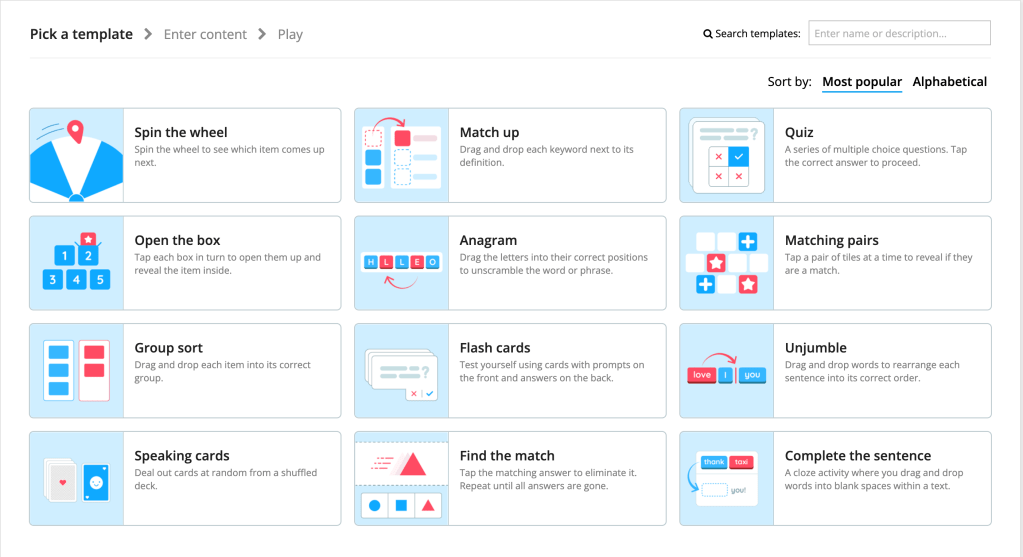
There are several features that I love about this app, especially it’s ease of use. Start by creating an activity with one of several pre-designed templates. Activities can be interactive, printable, or both! Another feature I appreciate is that once you create an activity, you can easily change the template to reformat the activity without having to reprogram/enter the information. Premade activities can be edited to suit your needs and I don’t know about you, but sometimes I think it is nice to have some sort of blueprint to then edit to serve your needs. Teachers can assign activities through Wordwall.net which takes students directly to the assignment, bypassing the main activity page, which can be distracting for some. Lastly, activities can be embedded and teachers can track results of the assignments
The free version of wordwall.net gives educators access to the following templates. There are several more advanced templates that are behind a paywall, but there are several decent options available
Don’t forget to check out Wordwall.net today!
 unapologeticallyb00kish
Leave a comment